
Automatic mileage tracking by state
Your phone's GPS records the miles you drive in each state, plus the interstates and highways you traveled. No guessing where the state line was and no end-of-quarter reconstruction.
IFTA Track is the IFTA mileage tracker app for iPhone and Android. GPS logs your miles in every state, fuel logs keep gallons and receipts organized, and PDF trip reports make quarterly IFTA filing faster.


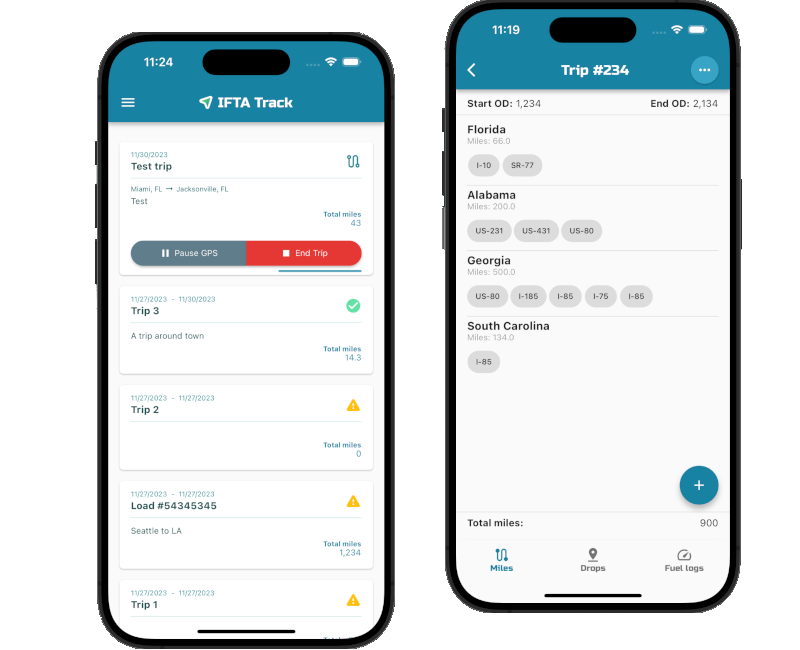
No spreadsheets, no paper trip sheets, no rebuilding the quarter from fuel receipts.
Tap start and IFTA Track records your route with GPS, even in the background. Prefer the odometer? Enter readings manually instead.
Miles are logged by state along with the interstates and highways you take. Add fuel stops and save drop locations as you go.
End the trip, auto-adjust miles to match your odometer, and export a PDF trip report with state-by-state miles for your quarterly return.
Replace paper logs and spreadsheets with one trucking app that records state miles, fuel purchases, and drop locations for every trip.
Your phone's GPS records the miles you drive in each state, plus the interstates and highways you traveled. No guessing where the state line was and no end-of-quarter reconstruction.
Save load drop locations throughout the trip so every delivery is tied to the right trip record.
Log every fuel stop with gallons and receipts. MPG is calculated automatically for each trip, so fuel tax prep is ready when the quarter closes.
Export clean PDF trip reports with miles by state for your records, your accountant, or your quarterly IFTA return.
Manage vehicles and drivers, assign trucks, add users with permissions, and keep IFTA data in sync across iPhone, Android, and multiple devices.
Start a trip and let IFTA Track keep the state-by-state log. When the quarter ends, your miles and fuel are already organized, so filing is a quick review instead of a weekend with a shoebox of receipts.
Premium adds cloud sync so owners, dispatchers, and drivers work from the same records. Add trucks, assign vehicles to drivers, control who can see what, and build reports across devices.
The cheapest pump price isn't always the cheapest fuel. Our free diesel price map compares the average diesel price in each state with its IFTA fuel tax rate, so you can see the real cost per gallon before you plan your next fuel stop.
View diesel prices by stateTry IFTA Track free for your first 5 trips, then choose the plan that fits your operation.
All the basic features, free to try.
5 trips included. No subscription needed.
Unlock unlimited trips.
or $24.99/year, save 30%
About $2.08/month, save 30%
Cloud sync and fleet management.
or $49.99/year, save 30%
About $4.17/month, save 30%
How IFTA Track works, what it costs, and the IFTA basics every carrier should know.
IFTA Track is a mobile app for iPhone and Android that tracks IFTA miles by state, logs fuel purchases, and exports trip reports to simplify quarterly International Fuel Tax Agreement (IFTA) reporting. It is built for owner-operators, trucking companies, and fleets.
When you start a trip, IFTA Track uses your phone's GPS, including in the background, to record the miles you drive in each state along with the interstates and highways you traveled. You can also enter odometer readings manually and auto-adjust GPS miles to match your odometer.
Yes. Add each fuel stop with the gallons purchased and the receipt. IFTA Track calculates MPG for every trip automatically, which keeps your fuel records organized for IFTA fuel tax reporting.
No. IFTA Track organizes the state-by-state miles and fuel records you need and exports them as PDF trip reports. You or your accountant use that information to file the quarterly return with your base jurisdiction. Always review your numbers before you submit.
Your first 5 trips are free. After that, Basic unlocks unlimited trips for $2.99 per month or $24.99 per year, and Premium adds cloud sync and fleet management for $5.99 per month or $49.99 per year.
Yes. The Premium plan lets you manage vehicles, assign them to drivers, add users with permissions, create and save reports, and sync data across devices and platforms.
The International Fuel Tax Agreement (IFTA) lets interstate motor carriers file one quarterly fuel tax return with their base jurisdiction instead of separate returns for every state and Canadian province they drive in. You generally need an IFTA license if you operate a qualified motor vehicle across jurisdictions: a vehicle with two axles and a gross vehicle weight over 26,000 pounds, a vehicle with three or more axles, or a combination over 26,000 pounds.
IFTA returns are due on the last day of the month after each quarter ends: April 30 for Q1, July 31 for Q2, October 31 for Q3, and January 31 for Q4. If a due date falls on a weekend or legal holiday, the deadline generally moves to the next business day.
Yes. Download IFTA Track from the Apple App Store for iPhone or from Google Play for Android. With Premium, your data syncs across both platforms and multiple devices.

Download IFTA Track for iPhone or Android and log your first 5 trips free.